Type Safety in WebGPU Applications: The TypeGPU Approach
 Iwo Plaza•Apr 10, 2025•12 min read
There are a few GPU-centric frameworks that solve particular problems, e.g., Three.js for 3D graphics and TensorFlow for AI inference. For more custom solutions, or those with stricter hardware requirements, many developers are forced to build from scratch on top of WebGL/WebGPU. This often involves having to implement binary serialization, dealing with raw binary data and sending untyped values between JS and the shader program. This is similar to the frontend and backend relationship in web apps, where both are more often than not separate code-bases with duplicated business logic, and loosely connected with, e.g., a REST API.
Recent technologies like tRPC or React Server Components blur the line between the client and server, allowing types to flow from one environment to the other, statically verifying that what the client is calling is actually there. At Software Mansion, we realized this same pattern could be applied to CPU and GPU communication. This is how TypeGPU was born — it’s our TypeScript library that enhances the WebGPU API, enabling type-safe apps that cross the CPU and GPU boundary.
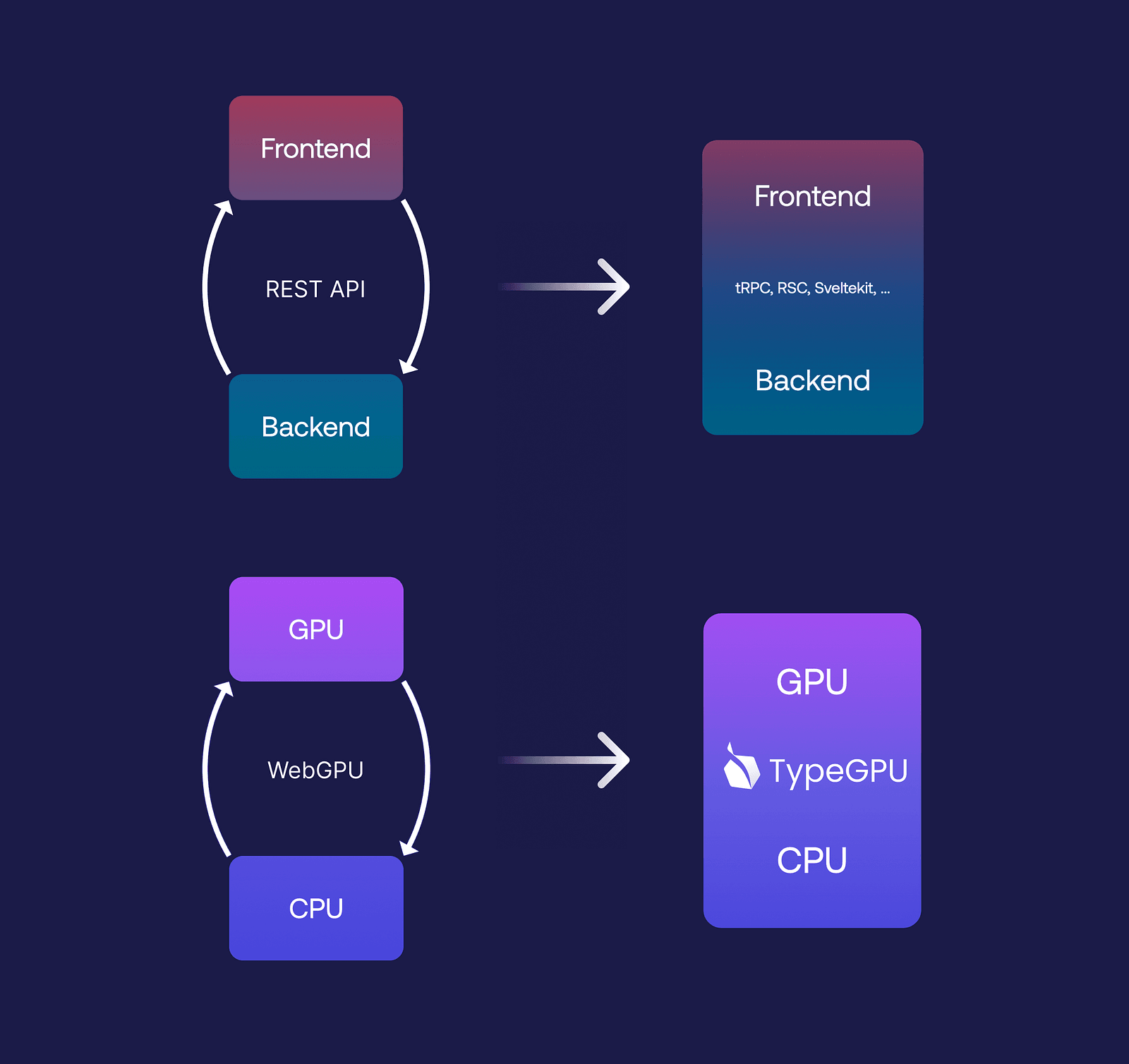
TypeGPU acts as a bridge between JavaScript and WebGPU, making data encoding and decoding more straightforward. By leveraging typed-binary, you can write GPU programs without worrying about byte-level details. You can also easily define complex data types like structs and arrays, while TypeScript automatically validates both incoming and outgoing data. Plus, TypeGPU is fully compatible with React Native.
Let’s dive into how it works, how it addresses common limitations of existing solutions, and what’s on our roadmap toward achieving end-to-end type safety on the GPU.
Why WebGPU matters
WebGPU is a modern, low-level GPU API that’s great for graphics and general computing tasks like video processing or AI inference — definitely a good one to have in your toolkit.
With its recent availability for React Native, it’s also truly cross-platform, supporting the web, React Native, and even Deno. To use it, you start with JavaScript, where you can dispatch commands, allocate resources, read from and write to GPU memory, and even send arbitrary shader code. This allows the GPU to process tasks in parallel or execute specific instructions.
But here’s the catch — the API isn’t really built with a type-safe language in mind. It’s designed for JavaScript. When you send WGSL code to the GPU (which is essentially just a raw code string), you then have to interface with it using numeric indices. That means you need to manually keep track of which indices correspond to which resources.
The actual code sent to the GPU looks something like this:
struct Boid {
  position: vec3f,
  velocity: vec3f,
}

@group(0) @binding(0) var<storage, read_write> boids: array<Boid, 32>;
It looks type-safe at first glance — you’ve got a struct called Boid with clearly defined fields, and you know the type of each field: both are vectors housing 3 floating-point numbers. From the JavaScript side, you’d expect this to be bound as a 32-element array of boids.
But here’s the issue: that type safety disappears the moment you cross from WGSL to JavaScript. You have to manually create a buffer, estimate its size, and remember that it’s a three-element vector. On top of that, all 3-element vectors need to be aligned to 16 bytes which means adding four bytes of padding between each of the array elements. Forgetting this detail can cause unexpected issues, like incorrect colors, with no obvious reason why. And since you can’t just console.log values on the GPU, debugging becomes a real challenge. In the end, you’re left manually constructing byte buffers, which is both tedious and error-prone.
Existing solutions and their limitations

The most popular 3d-graphics web library is Three.js, a high-level abstraction that sidesteps many of these challenges. With it, you can create 3D scenes, objects, and effects without worrying about the low-level details. However, if you need more control, you have to drop down to WebGPU or WebGL, where writing shaders becomes a necessity. Three.js is actively working on a new feature called TSL: a domain-specific language embedded into JS for defining node-graphs that compile into shaders, which is an amazing improvement over the status quo. That being said, it’s not without its drawbacks. The main limitation of Three.js is that it predates TypeScript, so things like type safety or context-aware auto complete were never core design considerations. In addition, mixing local AI inference (e.g., super-resolution) can become quite complex, as frameworks are rarely made to interoperate with each other.
Another solution is Shadeup, which addresses some of the same issues we set out to solve with our custom toolkit: TypeGPU. Its author created a custom language that compiles both to JavaScript and WGSL, allowing you to write CPU and GPU code in the same language while maintaining type safety. Shadeup is also modular, meaning you can compose shaders from multiple files. It’s an amazing solution, and we encourage you to try it out yourself, but there were a few things we felt like we could improve on. Having to learn a custom language comes with a steep learning curve — not something most developers are eager to do. On top of that, adopting Shadeup into existing JavaScript and WebGPU projects isn’t the easiest task.
How TypeGPU works
// Type-safe schemas

const Boid = d.struct({
  position: d.vec3f,
  velocity: d.vec3f,
});

// Initialization

const root = await tgpu.init();

const buffer = root.createBuffer(d.arrayOf(Boid, 32)).$usage('storage');

buffer.write(
  Array.from({ length: 32 }).map(() => ({
    position: d.vec3f(Math.random(), Math.random(), Math.random()),
    velocity: d.vec3f(Math.random(), Math.random(), Math.random()),
  })),
);
With TypeGPU, you define data-types using our typed primitives, mirroring WGSL syntax. This means you can create a Boid struct with position and velocity fields, just as before.
Instead of working directly with the WebGPU API, you can use the TypeGPU API to create a typed buffer. The important part is that TypeGPU keeps track of what data-type the buffer holds, and gives you that information on hover. This allows JS arrays and objects to be passed directly to the GPU, and TypeGPU will handle their byte representation for you. If there’s a mismatch, like passing something that isn’t a vec3f, the type-checker gives you instant feedback.
However, there’s still some duplication: the struct exists in both JavaScript and WGSL. That means any changes require manual updates on both sides, which isn’t ideal.
So, how to tackle the duplication? The ideal solution would be to represent everything that can be written or expressed in WGSL directly in JavaScript. With TypeGPU, we’re getting pretty close to that goal.
We’ve already made significant progress with several releases. Now, you can work with buffers, data types, bind groups, vertex layouts, and more. But there’s still a lot to do. Our roadmap includes implementing a variety of primitives that will allow us to achieve end-to-end type safety on the GPU.
The future of TypeGPU
The following code snippets showcase experimental APIs, which are accessible in official releases under certain configurations. Refer to our documentation, if you’d like to try them out yourself!
So, where do we want to be in the not-so-distant future? Let’s analyze this WGSL code:
@group(0) @binding(0)
var<uniform> factor: f32;

fn offset(num: f32) -> f32 {
  return num + factor;
}

fn scale(num: f32) -> f32 {
  return num * factor;
}

@compute @workgroup_size(32)
fn main() {
  let value = scale(11 + offset(4));
  // ...
}
Here, we have another uniform variable factor that can be provided by JS at runtime. We also have the offset function, which adds factor to the input and returns the result, as well as the scale function which multiplies the input by factor. Additionally, we have the main entry function of the shader, which uses both utility functions.
So, what would this look like in JS?
const layout = tgpu.bindGroupLayout({
  factor: { uniform: d.f32 },
});

// We can either implement functions in JavaScript...
const offset = tgpu.fn(
  { num: d.f32 },
  d.f32,
)((args) => {
  return args.num + layout.$.factor;
  // inferred as:            ^? number
});

// ... or in WGSL
const scale = tgpu.fn({ num: d.f32 }, d.f32)`{
  return num * layout.factor;
}
`.$uses({ layout });

const main = tgpu.computeFn({ workgroupSize: 32 })`{
  let value = scale(11 + offset(4));
  // ...
}
`.$uses({ scale, offset });
The same bind group layout can be defined as an object with a factor property (similar to var<uniform> factor in WGSL). Binding indices are determined by the order of the fields in the object, so we can skip defining them altogether.
tgpu is imported directly from the “typegpu” package, and it comes with APIs that will help us define the rest of the shader. tgpu.fn can be used to define a type-safe function signature which you can then implement.
Notice how we can implement these functions with either WGSL or JavaScript, and both can be referenced in other functions all the same. This means that you can decide which language to use on a per-function basis, which aids in both progressively migrating your shaders to JavaScript, or granularly ejecting back into WGSL.
Even though the syntax used inside of TypeGPU functions is 100% valid JavaScript, we call the subset of JS that we support along with our standard library as the TypeGPU Shading Language (TGSL).
For WGSL-implemented functions, pass in any external values via the$uses(…) method (in this case, the bind group layout or any other functions).
The great thing about this shader is that it’s composed of JS values. This means you can split them up, organize them into different files or modules, and make your shader code automatically modular. To resolve it into its WGSL form (so you can send it to the GPU) you can use the tgpu.resolveAPI. Thanks to our resolution algorithm, you can pass in just the main function, and it will automatically include both its definition and the definitions of all its dependencies.
// Returns a string of raw WGSL, containing
// `main`, `scale`, `offset` and `factor`.
const rawWgsl = tgpu.resolve({ externals: { main } });
Now, since we generate WGSL from JavaScript, you might wonder: is it possible to go the other way and generate JavaScript from WGSL? The answer is yes! That’s exactly why we created a package called tgpu-gen, which allows you to generate elements like buffers, bind groups, and data types from an existing WGSL shader.
You can use the package like this:
npx tgpu-gen **/*.wgsl           # for migration!
npx tgpu-gen **/*.wgsl --watch   # as a codegen step!
So, if you’re looking to migrate from a WebGPU app, you can simply use the resulting files and continue working with them as you normally would. Alternatively, if you prefer to write WGSL but still want the type safety, you can use it as a codegen step. Every time you make changes to your WGSL code, it’ll automatically regenerate the corresponding JavaScript in the background.
3 ways to incorporate TypeGPU into your workflow
Let’s explore some example use cases of how TypeGPU can fit into your workflow. There are three main scenarios:
- “I want to use TypeGPU in my existing WebGPU project”
- “I want to call the
xyzutility function from my shader without the full migration” - “I want to create a fully type-safe GPU program from scratch”
For the first use case, if you already have a WGSL shader (a file with your shader code), you can run npx tgpu-gen to generate the equivalent JavaScript for it, all while continuing to use your original shader code beneath the surface. This allows you to gradually adopt TypeGPU in your project without a full-scale migration:
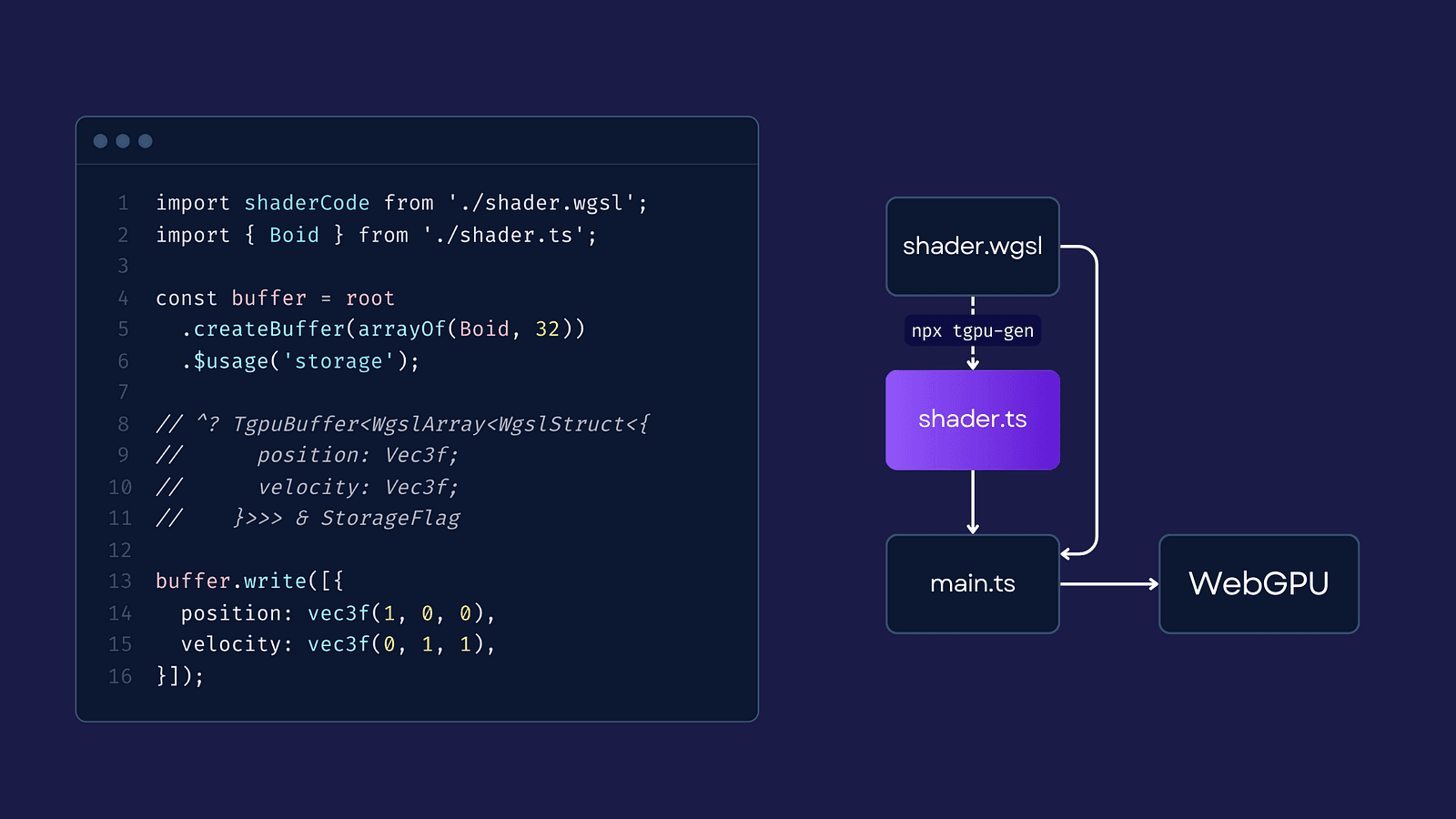
If you’re interacting with the program after it’s been dispatched, you can simply use the generated JavaScript primitives. For example, you can import the shader code and the relevant structures — like the Boid struct — and then create a buffer directly from the imported types.
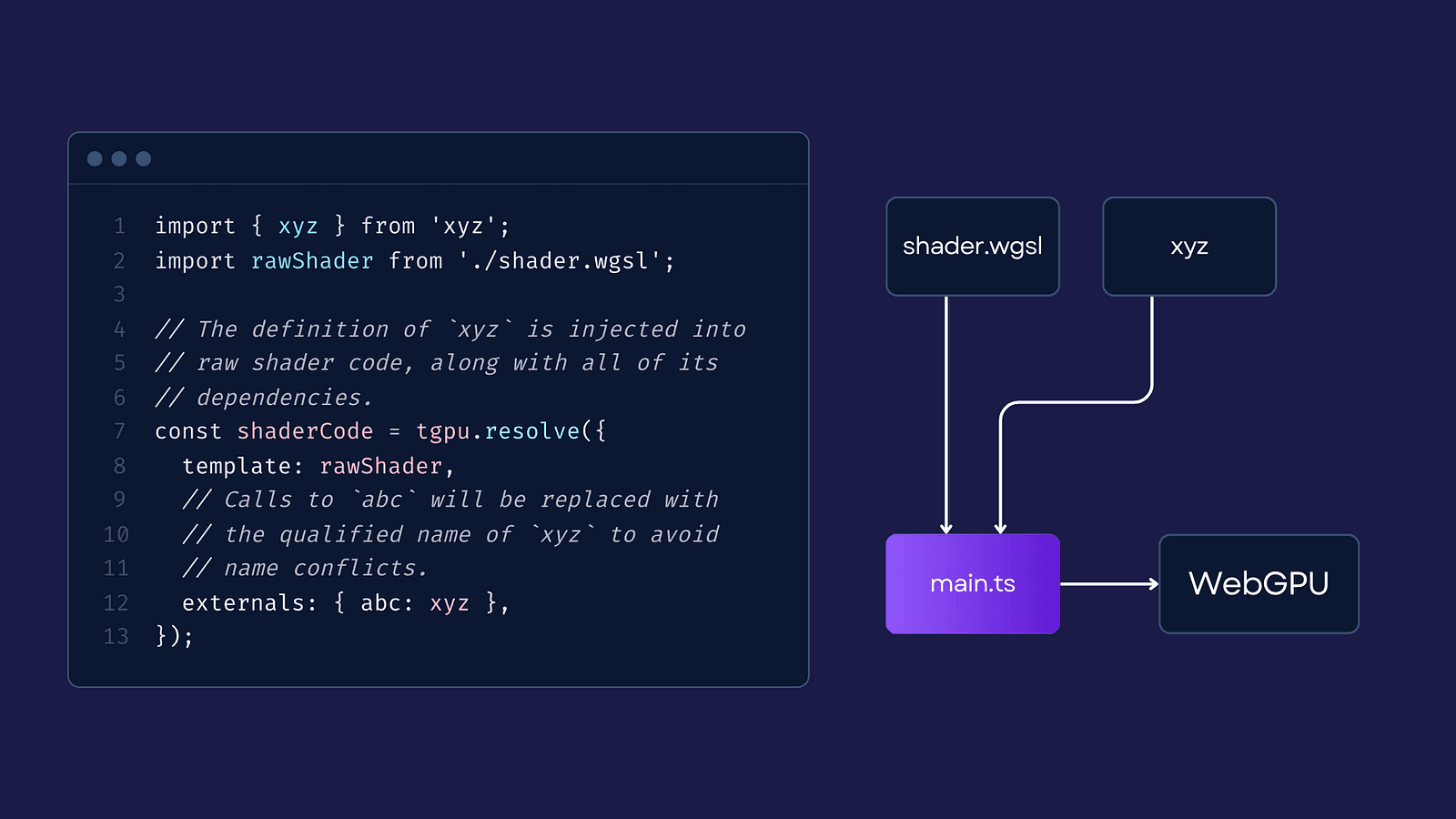
For the second use case, “I want to call the XYZ utility function from my shader without the full migration,” we can utilize TypeGPU’s linking capabilities. Instead of using the shader code directly, we use it as a template, and give TypeGPU all external dependencies it needs to include in the final shader code. This way, you can use utility functions coming from external packages without a full migration:
Finally, it’s time for the last use case: creating a fully type-safe GPU program from scratch. With TypeGPU, you can write all your code directly in JavaScript or TypeScript, making your codebase more unified & consistent. This means you can move seamlessly between CPU and GPU logic, relying on TypeScript to ensure type safety, which simplifies the process and keeps your workflow more straightforward:
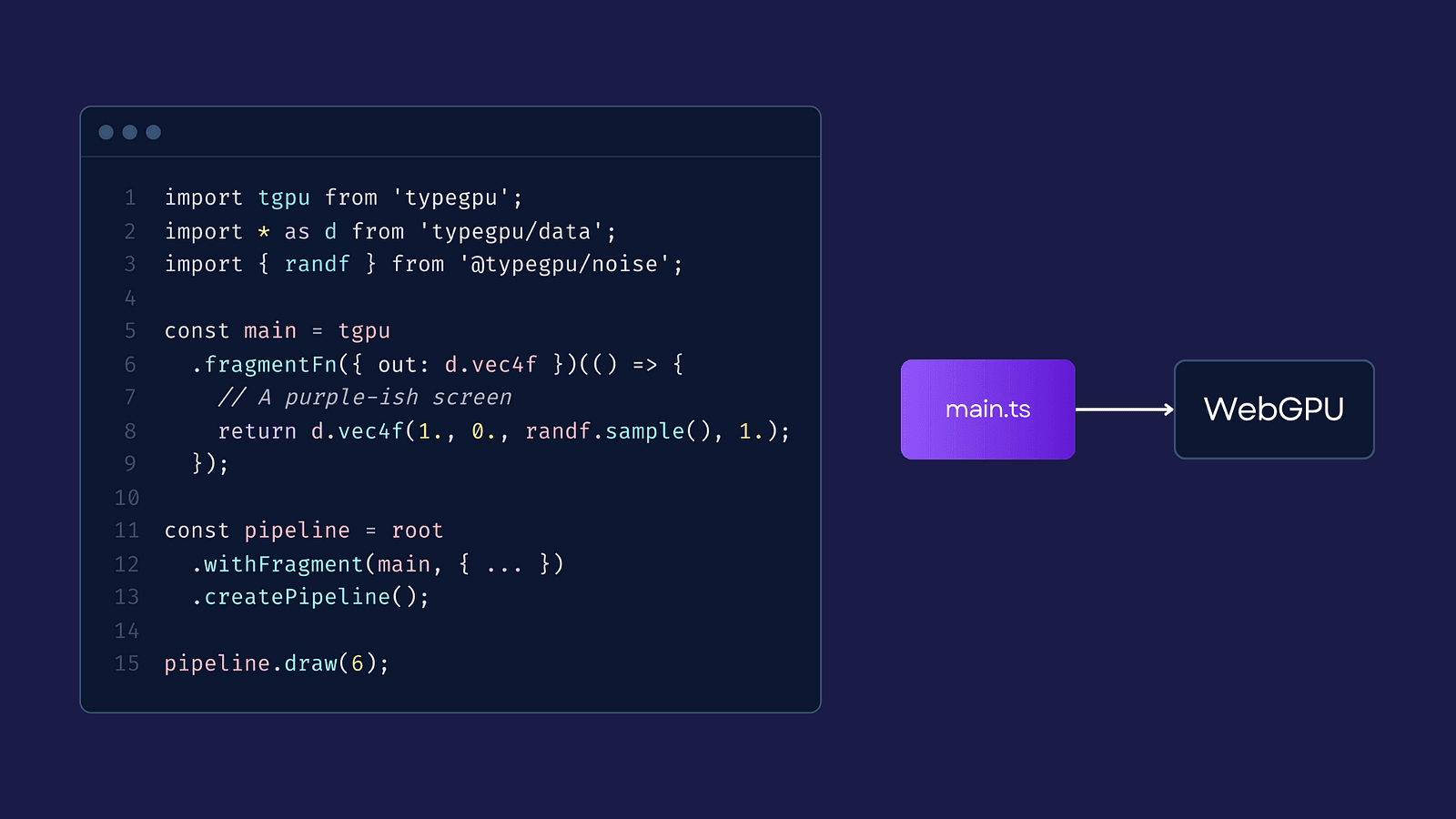
There’s more to come
Unlike other libraries that are tailored for specific use cases, TypeGPU provides a lightweight, type-safe layer on top of WebGPU that gives you the flexibility to use only what you need. Instead of offering a full-fledged GPU implementation for a particular domain, we focus on providing a minimal, core API that you can extend with additional modules.
With TypeGPU, you don’t have to worry about integrating a huge framework. Instead, you just include the core essentials and add the modules you need, which makes GPU programming easier and saves you from having to learn a new language.
So far, TypeGPU supports essential features like buffers, data types, and bind groups, but this is just the beginning. Our roadmap includes:
- Providing typed pipelines to ensure shader stages match and pipeline constants are filled with correct values.
- Wrapping functions in a “typed shell” to enable movement across different files/modules.
- Enabling writing imperative shader code in TypeScript, using TypeScript’s LSP to bridge the gap between our API and type-safe shader code.
We’re planning to add more modules, like AI inference utilities and noise generators, and we’re looking forward to community contributions along the way, so stay tuned for more!
Prefer the video format? Check out the recording from one of our RNCK meetups:
We’re Software Mansion: multimedia experts, AI explorers, React Native core contributors, community builders, and software development consultants. Hire us: [email protected].