
React Native ExecuTorch — release v0.4.0
 Jakub Chmura•May 28, 2025•6 min read
Introducing React Native ExecuTorch v0.4.0

With the rise of small language and vision-language models like Gemma 3n, on-device AI is becoming more powerful and accessible. React Native ExecuTorch makes it easy to integrate fully local AI features into your React Native apps — whether you’re working with natural language processing, computer vision, or deploying your own custom models.
What’s new in React Native ExecuTorch?
It’s been a while since we announced version 0.3.0 of the library, and we’re back with another release. This update unlocks support for multiple new LLMs, tool calling, text embedding models, and new computer vision capabilities, making it possible to run them entirely offline in your mobile apps, with no server connection required.
Let’s unwrap what’s new in this release, what it lets you do, and how you can try it out.
On-device LLMs & NLP
Support for new LLMs
When the library first launched, it only supported the LLaMA 3.2 family — but since then, the world of small language models has grown, with new ones like Qwen 3 and SmolLLM entering the scene. In this React Native ExecuTorch release, we’ve expanded support to include a broader range of models to give you more flexibility and choice:
- Qwen 3
- Qwen 2.5
- SmolLLM 2
- Phi 4 Mini
- Hammer 2.1 (for tool calling purposes)
If you’re not technical but curious about how this works, we’re developing an app for the App Store that will let you explore our AI capabilities without needing to build or install anything yourself, stay tuned. 👀
LLM API
We’ve also made improvements to the public API. After reviewing its current design, we realized it made managing multiple conversations and handling chat history more difficult than it should be. To address this, we’ve introduced new generation function which now accepts an array of messages representing the current conversation history. Here’s a quick code snippet showing you how you can achieve chat completions using React Native ExecuTorch:
import {
  useLLM,
  LLAMA3_2_1B,
  LLAMA3_2_TOKENIZER,
  LLAMA3_2_TOKENIZER_CONFIG,
} from 'react-native-executorch';

// ... rest of your component
const llm = useLLM({
  modelSource: LLAMA3_2_1B,
  tokenizerSource: LLAMA3_2_TOKENIZER,
  tokenizerConfigSource: LLAMA3_2_TOKENIZER_CONFIG,
});

const handleGenerate = async () => {
  const chat = [
    { role: 'system' content: 'You are a helpful assistant' },
    { role: 'user', content: 'Hi!' },
    { role: 'assistant', content: 'Hi!, how can I help you?'},
    { role: 'user', content: 'What is the meaning of life?' },
  ];
  // Chat completion
  await llm.generate(chat);
  console.log('Llama says:', llm.response);
};
Message array enables you to pass conversation history as an array of message objects, making multi-turn conversations seamless and intuitive. If you’d rather not handle conversation state manually, the built-in sendMessage function offers a stateful alternative.
Universal tokenizer support is an upgrade from the previous .bin format. We now support any tokenizer compatible with HuggingFace's tokenizers library, which opens the door for running custom LLMs and takes advantage of the growing ecosystem of tools like HuggingFace Optimum-ExecuTorch. To make it possible, we introduced a new tokenizerConfigSource prop.
Tool calling capabilities
Tool calling enables models to interact with external functions, APIs, and native platform capabilities in a structured way. You can define a set of tools that the LLM can invoke when responding to prompts, turning conversations from simple text exchanges into actionable workflows.
This capability unlocks the potential for personal assistants that don’t just respond to text — they can take actions. Your assistant can now check calendar events, schedule appointments, fetch real-time data, or integrate with any service you need. The possibilities extend far beyond basic conversation.
To power these capabilities, we’re providing pre-exported Hammer 2.1 (1.5B), a specialized model trained specifically for accurate and reliable tool execution in real-world scenarios. Getting started is straightforward: simply pass your tool definitions to the generate function. For implementation details and examples, visit the tool calling section of our documentation.
Text embeddings
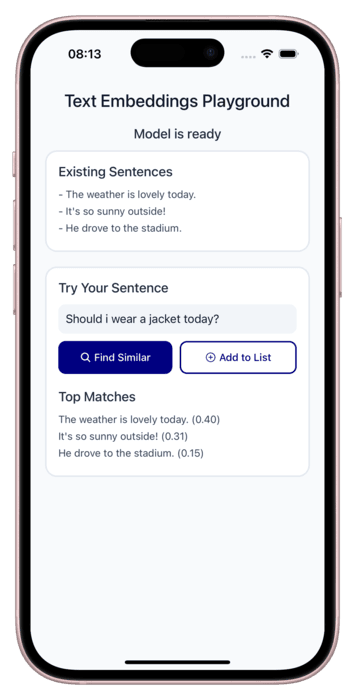
We’ve also added support for text embeddings, enabling you to represent text as high-dimensional vectors for advanced use cases like semantic search, clustering, and recommendation systems. We see embeddings as a foundational building block for the future of on-device RAG applications, where you can create context-powered systems that work entirely offline. Speaking of which — a dedicated library for building local RAG solutions is already in development 🚀.
Multilingual STT & streaming
In our previous release, we introduced the ability to transcribe spoken words into text using models like Whisper.en and Moonshine. While these models delivered strong performance, they were trained specifically for English, which limited accessibility for global user base.
We heard the feedback from our community — many of you asked for broader language support. In response, this release expands our transcription capabilities to include a multilingual version of Whisper. You can find out how to use it in the docs.
In addition to multilingual support, we’ve also added the ability to run transcription models in a streaming fashion. This means you can now process audio in real time, enabling faster and more interactive voice-driven applications. If you want to dig deeper, we encourage you to check out this code snippet.
Computer vision
Image segmentation
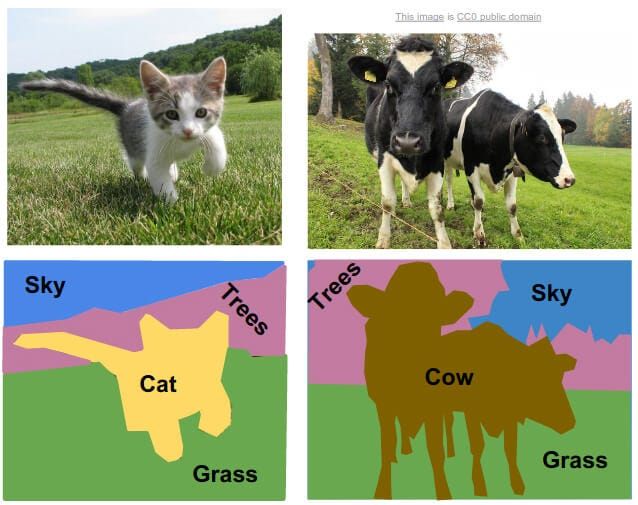
Semantic segmentation enables pixel-level image understanding by classifying each individual pixel into specific categories. While object detection simply detects bounding boxes around objects, semantic segmentation provides precise, pixel-level localization — giving you detailed masks that outline exactly where each object or region appears in an image. The implementation follows our consistent computer vision API pattern: simply pass an image URI to the forward function, and the model returns detailed segmentation results. We’re launching with DeepLab v3 (ResNet-50 backbone) as the model powering for this feature.
Multilingual OCR
Building on the OCR feature introduced in v0.3.0, we’ve expanded optical character recognition to support multiple alphabets, making text extraction more versatile. Beyond broader language support, this release delivers performance improvements. We’ve reduced the model size by up to 10 times, depending on the model, resulting in smaller app binaries and faster, more efficient text recognition.
Closing remarks
This release represents a major step forward, but we’re just getting started. We believe on-device AI is the way forward, and we want this library to be a starting point for building applications that make use of it. As devices become more powerful and AI models grow smarter and more efficient, on-device AI is poised to have its moment.
We want to hear from you!
Your input is invaluable to us. Whether it’s new model requests, bug reports, or general suggestions, please join the conversation on our Discord channel or GitHub Discussions. We also encourage you to share your projects and features you’re building with the library — it helps us understand what matters most to you and what we should prioritize next.